Cloudflare Kitesurf: Inside the Stateless V8-Isolate Browser Reimagining the Agentic Web
A deep technical analysis of Cloudflare Kitesurf: why legacy headless Chromium is a bottleneck for AI agents, how Rust and Wasm inside V8 isolates cut CPU/RAM footprint by 7x, and what this paradigm shift means for software architecture.
The Death of Human-Centric Browsers for AI Workloads
For over three decades, web browsers have been engineered around a single fundamental assumption: a human being is sitting in front of a screen.
Every architectural layer in modern browsers—from Blink and Gecko rendering engines to GPU-accelerated compositing pipelines, 60fps layout trees, extension host APIs, and persistent session state—exists to transform HTML, CSS, and JavaScript into a visual, interactive experience for human eyes.
However, in 2026, the fastest-growing consumer of web content is no longer human. Autonomous AI agents powered by LLMs, Model Context Protocol (MCP) servers, RAG ingestion pipelines, and multi-agent teams are continuously crawling, parsing, filling out forms, and executing workflows across the web.
When an AI agent interacts with a web page, it does not need a window frame, smooth scrolling, video codecs, or GPU shader compilations. It needs structured DOM nodes, fast JavaScript execution, low latency, and ultra-high concurrency.
Running full headless Chromium or Firefox instances inside Docker containers for these synthetic workloads has created a massive infrastructure bottleneck. To address this mismatch, Cloudflare introduced Kitesurf: a stateless, agent-first web browser designed ground-up to run directly inside V8 isolates on Cloudflare Workers.
The Bottleneck: Why Headless Chromium Fails at Scale
Until now, automated web interactions relied on running headless instances of traditional desktop browsers via tools like Puppeteer, Playwright, or Selenium. While functional, this approach suffers from deep architectural inefficiencies when applied to AI agent swarms:
- Massive Memory Footprint: A single headless Chromium process requires 250MB to 500MB of RAM just to launch an empty page. When scaling to thousands of concurrent agent tasks, memory costs surge exponentially.
- High Cold-Start Latency: Spawning a heavy OS-level browser binary inside a container takes anywhere from 1.5 to 4 seconds. For real-time agentic decision loops, this delay creates severe responsiveness bottlenecks.
- Wasted Compute on Unseen Pixels: Chromium spends substantial CPU cycles building visual rendering trees, performing CSS layout calculations, and managing paint layers—computations that an AI agent reading raw text or semantic DOM nodes never consumes.
- State Persistence Hazards: Traditional browsers maintain persistent disk caches, cookies, and process memory unless explicitly cleaned up, introducing memory leaks and cross-session security risks in serverless environments.
+-----------------------------------------------------------------------+
|                       LEGACY CONTAINERIZED HEADLESS                  |
|                                                                       |
|  [ OS Kernel ] -> [ Docker / VM ] -> [ Chromium Binary (300MB+ RAM) ] |
|                                       +-- Blink Rendering Engine      |
|                                       +-- GPU Compositing Pipeline    |
|                                       +-- 1.5s - 4.0s Boot Latency    |
+-----------------------------------------------------------------------+
When building high-volume RAG indexers or autonomous web agents, paying the memory and CPU tax of desktop rendering engines is no longer viable.
Cloudflare Kitesurf Architecture: How It Works under the Hood
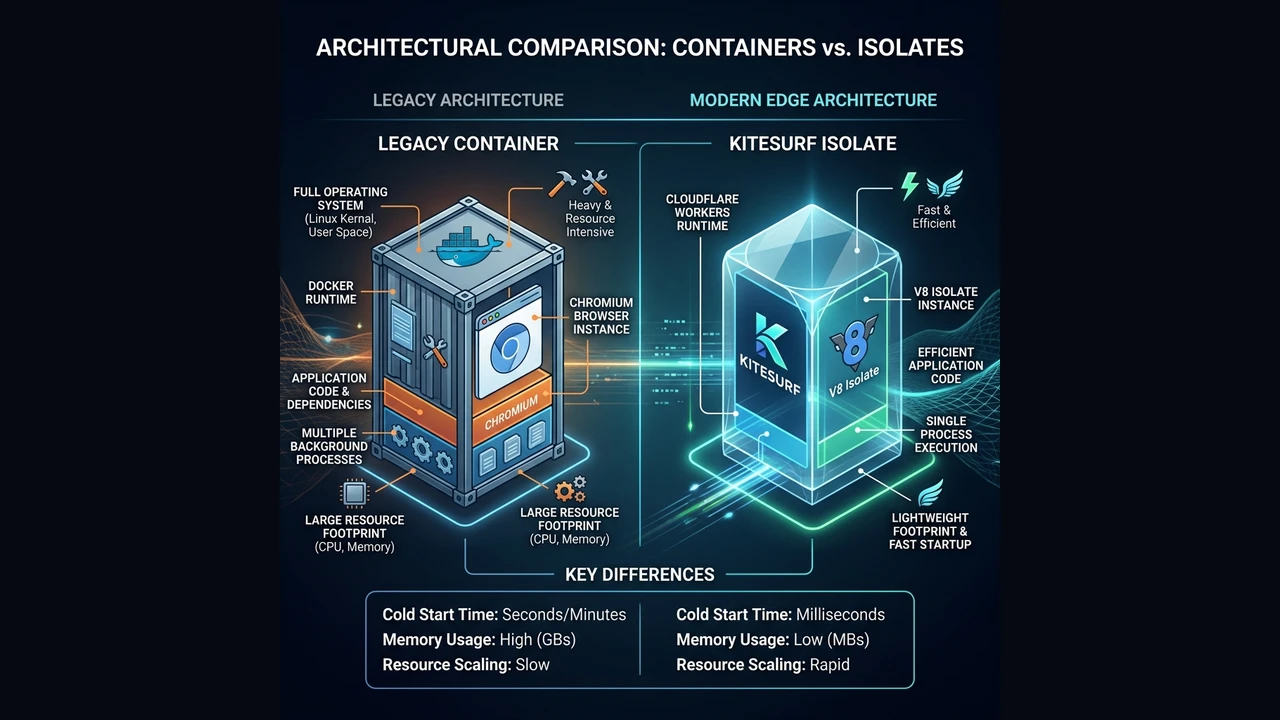
Kitesurf discards 30 years of desktop GUI legacy and replaces it with a lean, machine-centric execution engine engineered specifically for edge compute.
1. Engine Built in Rust and WebAssembly
Rather than bundling a multi-hundred-megabyte native C++ browser executable, Kitesurf’s core HTML parser, DOM implementation, and script coordinator are compiled into WebAssembly from Rust. This Wasm binary is small enough to load dynamically within microsecond thresholds.
2. Native Execution inside V8 Isolates
Traditional serverless browser solutions spawn a separate process outside the serverless worker runtime. Kitesurf runs directly inside Cloudflare Workers’ V8 isolates.
Because V8 isolates isolate execution memory at the JavaScript engine level without requiring full OS process boundaries:
- Boot times plummet from seconds to sub-milliseconds.
- Thousands of independent page sessions can run concurrently on a single physical edge machine.
3. Stateless by Design
Kitesurf operates as a purely stateless function. An agent invokes a session, Kitesurf loads the target URL, executes required scripts or DOM queries, extracts structured output (or generates a screenshot/PDF if requested), and immediately dismantles the isolate. No leftover state, no memory leaks, and zero risk of cross-tenant session contamination.
4. 3x to 7x Hardware Efficiency
By stripping away GPU rendering, audio/video pipelines, and desktop tab management, Cloudflare’s benchmarks show Kitesurf consumes:
- 3x to 7x less CPU per page load compared to headless Chromium.
- 4x to 7x less RAM, reducing per-session memory from ~300MB down to ~40MB.
5. Web Platform Compliance & CDP Support
Despite its lightweight design, Kitesurf is not a simplistic regex HTML scraper. It supports modern JavaScript execution, dynamic DOM manipulation, and passes over 215,000 Web Platform Tests (WPT).
Crucially, Kitesurf exposes a Chrome DevTools Protocol (CDP) endpoint, making it compatible with existing Puppeteer, Playwright, and MCP tooling via a simple URL parameter: browser=kitesurf.
Deep Dive Comparison: Kitesurf vs. Headless Chromium
| Technical Feature | Headless Chromium (Docker / VM) | Cloudflare Kitesurf (V8 Isolate) |
|---|---|---|
| Runtime Environment | Container / OS Process | Cloudflare Workers V8 Isolate |
| Startup Time | 1,500ms – 4,000ms | < 5ms |
| Memory per Session | 250MB – 500MB | 30MB – 50MB |
| CPU Footprint | High (Blink Layout + Paint) | Ultra-Low (Machine DOM Only) |
| State Lifecycle | Stateful (Requires manual reset) | Stateless & Ephemeral |
| Protocol Compatibility | CDP / WebDriver | CDP (browser=kitesurf) |
| Primary Target | Human visual testing / E2E | AI Agents, RAG, Web Scraping |
| Fallback Scenarios | WebGL, Video, Bot Protection | Chromium required for complex WebGL |
Interacting with Kitesurf: REST & SDK Examples
Using Kitesurf within Cloudflare’s Browser Run API requires adding browser=kitesurf to your request.
Example 1: Quick Action REST API (cURL)
curl -X POST "https://api.cloudflare.com/client/v4/accounts/${CLOUDFLARE_ACCOUNT_ID}/browser-run/screenshot?browser=kitesurf" \
     -H "Authorization: Bearer ${CLOUDFLARE_API_TOKEN}" \
     -H "Content-Type: application/json" \
     -d '{
       "url": "https://labitcode.com",
       "viewport": { "width": 1280, "height": 720 }
     }' \
     --output screenshot.png
Example 2: Puppeteer Integration in Cloudflare Workers
import puppeteer from "@cloudflare/puppeteer";

export interface Env {
  MY_BROWSER: Fetcher;
}

export default {
  async fetch(request: Request, env: Env): Promise<Response> {
    // Connect to Kitesurf by appending the browser query parameter
    const browser = await puppeteer.launch(env.MY_BROWSER, {
      browser: "kitesurf",
    });

    const page = await browser.newPage();
    await page.goto("https://news.ycombinator.com");

    // Extract structured content directly from DOM
    const titles = await page.evaluate(() => {
      return Array.from(document.querySelectorAll(".titleline > a")).map(
        (el) => (el as HTMLAnchorElement).innerText
      );
    });

    await browser.close();

    return Response.json({ count: titles.length, titles });
  },
};
The Paradigm Shift: Building for the Agentic Cloud
Kitesurf is more than a cost-optimization feature; it signals a fundamental structural shift in web development and cloud infrastructure.
1. From Human Web to Machine Web
Historically, applications provided APIs (REST, GraphQL) for machine consumption and HTML pages for human consumption. But large swaths of the web will never offer public APIs.
As autonomous AI agents become primary web navigators, tools like Kitesurf enable the un-API’d web to be queried programmatically with low cost and near-zero latency. The web interface becomes a universal machine-to-machine (M2M) protocol.
2. Cost Deflation in Multi-Agent Swarms
In multi-agent systems, an orchestrator agent might delegate tasks to sub-agents that concurrently browse dozens of sources to verify facts, cross-reference pricing, or pull documentation.
Reducing per-session compute costs by 80%+ moves these multi-agent workflows from theoretical prototypes into economically viable production systems.
                                  +--> [ Kitesurf Session 1 ] -> Site A
                                  |
[ Orchestrator Agent ] --(MCP)----+--> [ Kitesurf Session 2 ] -> Site B
                                  |
                                  +--> [ Kitesurf Session 3 ] -> Site C
3. V8 Isolate Security Boundaries for Untrusted Web Content
Executing untrusted third-party JavaScript scraped from arbitrary websites carries security risks. Containers rely on kernel namespaces and cgroups, which are vulnerable to container escape exploits if unpatched.
Running untrusted web scripts within V8 isolates leverages the multi-tenant security architecture that powers global edge networks, sandboxing memory execution without OS overhead.
When to Use Kitesurf vs. Headless Chromium
While Kitesurf is ideal for most agentic tasks, engineering teams should evaluate their workloads against specific technical constraints:
-
Choose Kitesurf for:
- High-throughput web scraping and text extraction for RAG pipelines.
- Ephemeral MCP tool calls (e.g., “Check weather on site X”, “Summarize article Y”).
- Automated HTML-to-PDF generation and fast visual screenshotting.
- Low-cost, bursty serverless workflows on edge networks.
-
Fallback to Headless Chromium for:
- Pages requiring WebGL / Canvas 3D hardware acceleration.
- Continuous video/audio streaming verification.
- Complex bot protection systems that inspect native browser TLS fingerprints and hardware capabilities.
Conclusion: Infrastructure Adapting to AI First
The transition to agentic software requires re-architecting every layer of the tech stack. Just as cloud-native computing replaced bare-metal servers with containers and microservices, the AI era requires infrastructure designed specifically for autonomous models.
Cloudflare Kitesurf demonstrates what happens when we stop forcing AI agents to use human tools and instead build machine-native abstractions. By combining Rust, WebAssembly, and V8 isolates, Kitesurf turns the browser into a lightweight, stateless utility function—setting a new benchmark for the Agentic Cloud.
Written by Alfonso Garcia.
Join the conversation
Have thoughts on this post? Share them on social media or reach out directly.
Related Posts

The AI Velocity Trap: Why Altman, Amodei, and Musk Tried to Hit the Brakes
In an unprecedented 72 hours, fierce rivals Sam Altman, Dario Amodei, Demis Hassabis, and Elon Musk agreed on one terrifying reality: AI is advancing too fast, recursive self-improvement is starting, and we have no brakes. Then geopolitical game theory slammed the door shut.
Spec-Driven Development in the Age of AI: OpenSpec vs. GitHub Spec Kit
Why 'vibe coding' fails at scale and how Spec-Driven Development (SDD) turns AI agents into reliable engineering partners. A deep technical comparison of OpenSpec and GitHub Spec Kit with real-world workflows, CLI commands, and architectural patterns.